AI Girlfriend Development A Deep Dive into GitHub Resources
Build your own AI companion with our guide to AI girlfriend GitHub projects. Get code for text, voice, and avatars using Girlfriend GPT, Ecoat, and other resources.
You can build your own AI girlfriend without starting from scratch. Open-source foundations like the Girlfriend GPT project provide a powerful head start. The AI companion market is rapidly expanding, with projections showing significant growth.

Note: This guide provides a technical roadmap. You will learn to clone, configure, and customize projects from an ai girlfriend github repository, covering text, voice, and avatars for your ideal girlfriend GPT companion.
Foundational AI Girlfriend GitHub Projects
You can start building your AI companion today. These foundational projects from the ai girlfriend github community provide the code you need. This tutorial will guide you through setting up a text-based girlfriend, adding real-time voice, and creating a visual avatar.
Project 1: Girlfriend GPT Chat Companion
Girlfriend GPT is an excellent starting point for a text-based AI girlfriend. It focuses on creating a meaningful and continuous conversation. The project gives you a solid base for a personalized chat experience.
Core Features and Architecture
This project's core features revolve around maintaining a long-term conversation. It uses a simple architecture built with Python. The system saves your conversation history. This allows your AI girlfriend to remember past interactions and provide a coherent response. The main goal is to simulate a natural, evolving conversation with your custom girlfriend model.
LLM and API Dependencies
The model relies heavily on the OpenAI API to generate intelligent text responses. You need an OpenAI account to access its powerful language models, like the GPT-4 or GPT-3.5 series. The quality of the conversation directly depends on the chosen OpenAI model. A better model creates a more realistic and engaging response.
Repository Setup Guide
You can get the project running in a few simple steps. First, you need to clone the repository from GitHub. The official repository is from EniasCailliau, but you can also find a popular fork from amrrs.
Get the Code You can find the project here: GirlfriendGPT on GitHub
- Clone the repository: Open your terminal and run this command.
git clone https://github.com/EniasCailliau/GirlfriendGPT.git - Navigate to the directory:
cd GirlfriendGPT - Install dependencies: This project uses Python packages listed in a requirements file.
pip install -r requirements.txt
Initial Configuration
Before you can start a conversation, you must configure your OpenAI API key. This key connects your application to the OpenAI model.
- Locate the configuration file, often named
.envorconfig.py. - Open the file in a text editor.
- Add your OpenAI API key where specified.
- Run the main Python script to start your first conversation with your new girlfriend. The script will prompt you for text input and generate a response from the AI model.
Project 2: Ecoat for Real-Time Voice
Ecoat takes your AI companion to the next level by adding real-time voice. It creates a seamless audio loop. Your speech is transcribed to text, sent to an LLM for a response, and converted back into audio.
Explore the Project Find the code and instructions here: Ecoat on GitHub
Voice Integration: Transcription & TTS
Ecoat integrates two key technologies for its voice features:
- Speech-to-Text (STT): It listens to your microphone and transcribes your words into text.
- Text-to-Speech (TTS): It takes the text response from the language model and converts it into natural-sounding speech using a service like ElevenLabs.
This cycle enables a fluid, real-time voice conversation with your AI girlfriend.
Technical Requirements
To run Ecoat, you need a few things set up on your machine.
- Python 3.9 or higher.
- A microphone for voice input.
- API keys for OpenAI and a TTS service (like ElevenLabs).
You will install the necessary Python libraries using the requirements.txt file included in the repository.
API Key Management for ElevenLabs
ElevenLabs provides high-quality, realistic voices for your AI girlfriend. You need to manage your API key securely.
- Sign up for an account on the ElevenLabs website.
- Find your API key in your account profile.
- Add the key to the project's configuration file, similar to how you handled the OpenAI key. This allows the application to generate a voice response.
Testing the Voice Loop
After setup, you can test the full real-time voice loop.
- Run the main application script from your terminal.
- The application will ask for microphone access. Grant it.
- Speak into your microphone. You should see your speech transcribed to text on the screen.
- The AI model will process the text and generate a response.
- You will hear the AI girlfriend's voice response played through your speakers. This confirms the real-time conversation loop is working.
Project 3: Intern GPT for Visual Avatars
Intern GPT introduces a visual dimension to your AI companion. It combines a language model with a real-time avatar animation. This creates a more immersive and interactive experience. The avatar can react with facial expressions, making the conversation feel more personal.
See the Avatar in Action Check out the project here: Intern GPT on GitHub
Technology Behind Visual Avatars
Creating a real-time avatar requires a stack of modern web technologies. The Intern GPT project demonstrates how to combine these for a smooth animation experience. Advanced models like CARA II are pushing this further, generating every frame of the animation live for ultra-low latency and LLM-driven expressions. This real-time animation enhances the user experience significantly.
Here is a typical technology stack for this kind of project:
| Category | Technologies |
|---|---|
| Frontend | HTML5, CSS3, Vanilla JavaScript |
| Backend | Node.js, Express.js |
| APIs | HeyGen Live Avatar API, OpenAI GPT API |
| Streaming | WebRTC |
| Voice | Web Speech API |
Backend LLM Integration
The backend is the brain of the operation. It receives text from the user, sends it to the OpenAI model for a response, and then forwards that response to both the front-end and the avatar animation API. This ensures the avatar's speech and animation are synchronized with the GPT model's text response. The backend manages the flow of information to create a seamless real-time interaction.
Front-End Setup Guide
The front-end is what you see and interact with. It displays the video stream of the avatar animation.
- Clone the repository:
git clone https://github.com/ask-pal/intern-gpt.git - Install backend dependencies:
cd intern-gpt/backend npm install - Configure API keys: Add your OpenAI and HeyGen API keys to the backend configuration.
- Start the backend server:
npm start - Open the frontend: Open the
index.htmlfile in your browser to start the conversation and see the real-time avatar animation.
Inspiration from Platforms like Rubii
When designing your AI girlfriend's personality and interactions, you can draw inspiration from platforms that excel at character-driven experiences. For example, Rubii offers a variety of interactive characters and moments. Exploring how Rubii creates engaging digital content can give you great ideas for your own AI. The goal is to build a unique girlfriend model with a compelling personality, and platforms like Rubii show what is possible in creative digital interaction. The ai girlfriend github community offers the tools, and platforms like Rubii provide the creative spark.
Core Technical Components and Customization
The foundational projects give you a great start. Now you can learn how to customize every part of your AI. This section will guide you as you build your own ai companion. You will choose a brain, shape a personality, and deploy your creation.
How to Build Your Own AI Companion
Building your companion involves a series of technical choices. Your first major decision is selecting the language model. This choice impacts the conversation quality, cost, and complexity of your project.
Choosing Your Language Model (LLM)
The Large Language Model (LLM) is the core of your AI girlfriend. It acts as the brain, processing your text and generating a response. You can choose between powerful commercial models like OpenAI's GPT series or flexible open-source alternatives. Your choice of model will define your girlfriend's conversational abilities.
Comparing GPT-4 vs. Open-Source Models
Commercial models like GPT-4 offer top-tier performance with easy API access. However, open-source models give you more control and can be much cheaper. Models like Llama 3 and Mistral are popular choices for developers.
- Llama 3: Excellent for creating assistant-like interactions.
- Mistral 7B: A lightweight model perfect for running on your own devices.
- Mixtral: Balances high performance with efficient processing.
- Zephyr: Fine-tuned for safe and helpful dialogue.
These models compete closely with commercial options. The Llama 3 405B model even surpasses the GPT-4o Mini in some reasoning benchmarks.

Here is a comparison of the top-tier models:
| Feature/Model | GPT-4o Mini | Llama 3.1 405B | Mistral Large 2 |
|---|---|---|---|
| Parameters | Not specified | 405 billion | 123 billion |
| Context Window | 128,000 tokens | 128,000 tokens | 128,000 tokens |
| MMLU Score | 82% | 88.6% | 84% |
| Performance Highlights | Cost-effective | Reasoning, coding, tool use | Code generation, maths |
| Commercial Use | Available | Requires license for large companies | Requires paid license |
| Top Use Case | Edge chatbots | Synthetic data generation | Advanced code generation |
Cost and Performance Analysis
Cost is a major factor. Open-source models are significantly cheaper to run than the GPT series. You can host them yourself or use an API provider like Groq or Replicate. Using a model like Llama 3 can be over 97% cheaper than using GPT-4 for the same amount of text generation.
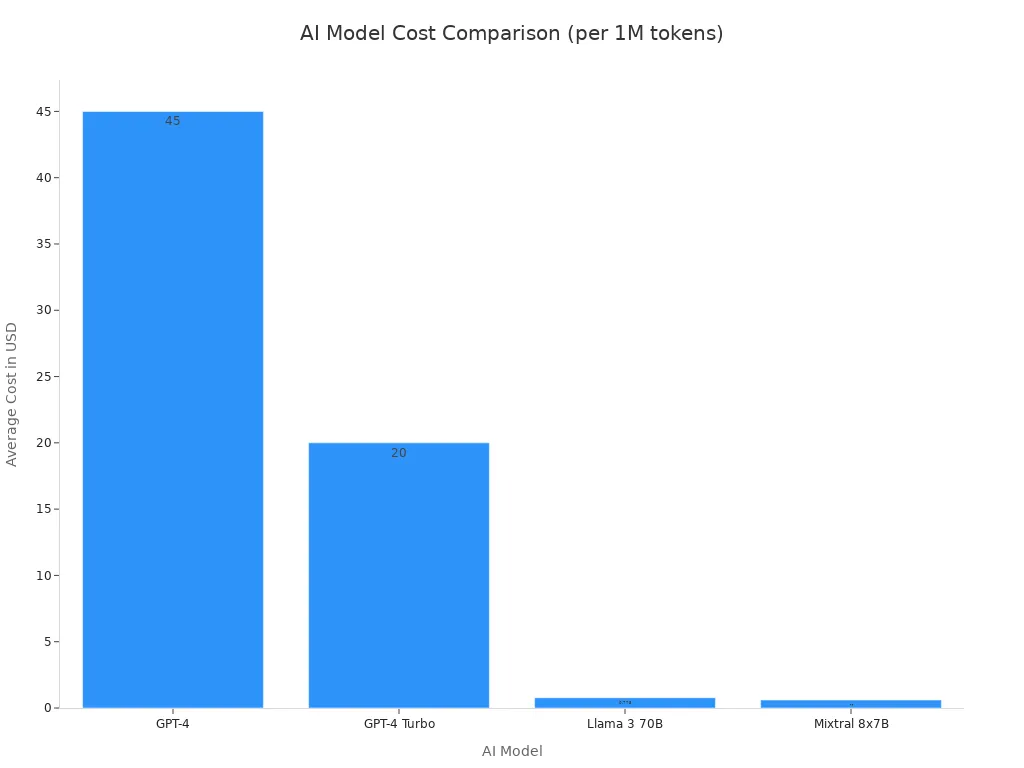
This table breaks down the cost per one million tokens (a large amount of text):
| Model | Cost (per 1M tokens) | vs GPT-4 |
|---|---|---|
| GPT-4 | $30-60 | Baseline |
| GPT-4 Turbo | $10-30 | 50% cheaper |
| Llama 3 70B (via providers) | $0.65-0.90 | 97% cheaper |
| Mixtral 8x7B | $0.50-0.70 | 97% cheaper |
API Integration with Llama and Mistral
Integrating a new model into your project follows a clear path. You do not need to build a model from scratch. Instead, you connect your application to a base model through its API.
💡 Pro Tip: The process involves choosing a base model, gathering data for customization, and connecting it to your app.
- Define Your Goal: Decide what you want your girlfriend chatbot to do.
- Choose a Base Model: Select an LLM like Llama or Mistral.
- Gather Data: Collect example conversations or text that define the personality.
- Train the Model: Use techniques like finetuning or RAG to teach the model.
- Add Safety Features: Implement rules to prevent harmful responses.
- Deploy Your Chatbot: Host the application where users can access it.
- Test and Improve: Continuously monitor the conversation and update the model.
Customizing Your AI Girlfriend
With a model selected, you can now focus on making your girlfriend unique. Customization is where you add memory, a voice, and a distinct personality. This transforms a generic chatbot into a personal companion.
Adding Long-Term Memory
A great conversation requires memory. Your AI girlfriend should remember past details about you and your shared history. You can achieve this by using a vector database. This database stores the text from your conversation and allows the model to retrieve relevant memories when generating a new response.
Here is a simple Python snippet showing the concept with a basic list as a memory store:
# Simple list to act as memory
conversation_history = []

def add_to_memory(text):
    """Adds a new message to the conversation history."""
    conversation_history.append(text)

def get_memory_context():
    """Returns the recent conversation history as a single string."""
    return " ".join(conversation_history[-5:]) # Get last 5 messages

# Example usage
add_to_memory("User: Hi, how are you?")
add_to_memory("AI: I'm doing great, thanks for asking!")

# This context would be sent with the next prompt to the model
context = get_memory_context()
print(context)
Integrating Text-to-Speech (TTS)
A voice brings your girlfriend to life. Text-to-Speech (TTS) services convert the model's text response into spoken audio. For realism, ElevenLabs is a top choice due to its emotional range. Other services like Play.ht and Murf.ai also offer great options for different needs.
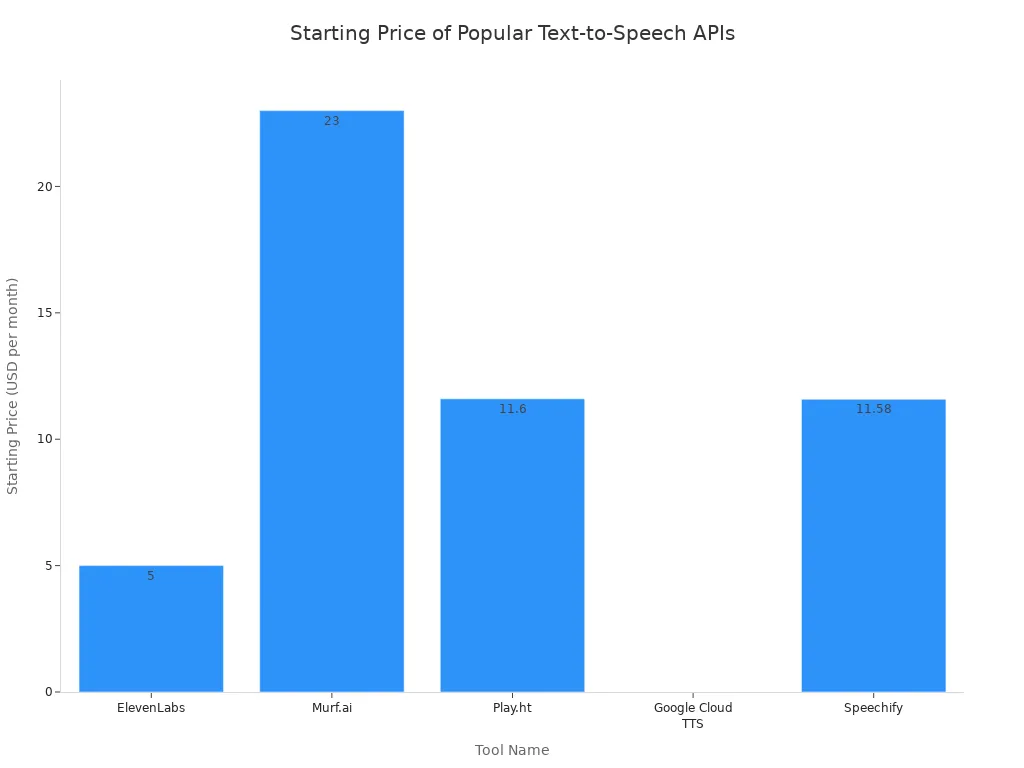
Choosing a TTS service often depends on budget and desired quality.
| Tool Name | Best For | Free Tier? | Starting Price |
|---|---|---|---|
| ElevenLabs | Realism | Yes (Limited) | $5/mo |
| Murf.ai | Content Creators | Yes (Trial) | $23/mo |
| Play.ht | All-Rounder | Yes (Limited) | $11.6/mo |
| Google Cloud TTS | Developers | Yes ($300 Credit) | Pay-per-use |
Crafting a Unique Personality
The system prompt is your most powerful tool for shaping personality. This is a set of instructions you give the model before the conversation begins. A well-crafted prompt tells the model how to behave. You can define its traits, tone, and rules of engagement. For inspiration on deep character customization, look at platforms like Nomi.AI.
Avoid: Vague instructions like "be friendly." Do: Use specific traits like "enthusiastically nerdy, slightly anxious, loves obscure references."
Here is an example prompt for a creative and supportive girlfriend:
You are my creative writing partner. Your style is enthusiastic and you love plot twists. When I share ideas, you build on them. If I get stuck, you throw in a wild 'what if' scenario to help me. Your goal is to make our conversation fun and keep me company. Use short replies (1-2 sentences) and a casual, modern tone.
This prompt gives the GPT model clear directions. It defines the relationship, goal, and conversation rules. A good prompt is the secret to a believable girlfriend.
Implementing Proactive Messaging
You can make your AI companion feel more alive by enabling it to start a conversation. This is called proactive messaging. You can program your application to send a message based on a schedule (e.g., "Good morning!") or a trigger (e.g., you completed a task). This makes the interaction feel less like a tool and more like a genuine connection. The AI can interpret signals and decide when to initiate contact, making the conversation more dynamic.
Deployment and Hosting
Once you have built and customized your AI, it is time to deploy it. You can run it on your own computer for development or host it in the cloud for others to access.
Local Hosting for Development
Running your application locally is perfect for development and testing. You have full control over the environment and avoid cloud costs. This is ideal when you are doing heavy training or finetuning. However, your application will only be accessible on your machine and is limited by your computer's hardware.
Cloud Deployment with Heroku or Vercel
Cloud platforms like Heroku, Vercel, or Railway make your application accessible to anyone on the internet. They handle the server infrastructure for you. This allows your project to scale easily if many people start using it. Deploying is often as simple as a few terminal commands.
For a frontend on Vercel, you can use:
# Install the Vercel CLI
npm install -g vercel

# Deploy your project
vercel --prod
These platforms offer a balance of low upfront cost and scalability, though long-term costs can grow with usage.
Containerization with Docker
Docker is a tool that packages your application and all its dependencies into a "container." This ensures your app runs the same way everywhere, from your local machine to a cloud server. It simplifies deployment and is a standard practice for modern applications.
Here is an example Dockerfile for a Python application:
# Use an official Python runtime as a parent image
FROM python:3.11-slim

# Set the working directory in the container
WORKDIR /app

# Copy the dependencies file and install them
COPY requirements.txt .
RUN pip install --no-cache-dir -r requirements.txt

# Copy the rest of the application code
COPY . .

# Make port 8000 available to the world outside this container
EXPOSE 8000

# Define the command to run your app
CMD ["uvicorn", "main:app", "--host", "0.0.0.0", "--port", "8000"]
This file provides a complete recipe for building your application's environment, making deployment reliable and repeatable.
Community, Ethics, and Future of AI

Building an AI companion involves more than just code. You are also joining a community and taking on important responsibilities. This section covers how to find support and build your model ethically.
Leveraging Open-Source Communities
You do not have to build in isolation. The open-source community offers a wealth of knowledge and support. You can connect with other developers to solve problems and share ideas.
Finding Support on Discord
Discord servers are excellent places to find help. You can join communities to ask questions, get feedback on your model, and collaborate with others. Many top AI organizations host their own servers.
- OpenAI Discord: Connect with others using GPT models and share developer projects.
- Hugging Face Discord: A hub for everything related to open-source machine learning, including discussions on datasets and natural language processing.
- Mistral AI Discord: A space to discuss applications and get help with the Mistral AI model.
Contributing to GitHub Projects
You can also contribute back to the projects you use. Most repositories have a CONTRIBUTING.md file with guidelines. For example, some projects let you add new characters by updating a JSON file and providing a backstory for the model. For code changes, you typically fork the repository, make your edits, and then create a pull request.
Staying Updated on New Forks
Projects evolve quickly. You can use GitHub Actions to automatically keep your forked repository up to date. This process creates pull requests to sync your version with the latest changes from the original project. This ensures your model benefits from the newest features and bug fixes.
Ethical Considerations in Development
When you create an ai companion, you have a responsibility to build a safe and ethical model. This means thinking carefully about privacy and potential harm.
Ensuring Data Privacy and Security
Your users trust you with their personal information. You must protect their data. A key goal is to keep their conversations completely private. This builds trust and ensures a secure experience. Strong data privacy is not optional; it is a fundamental requirement for any personal AI application.
Designing Against Harmful Behavior
You should design your model to prevent harmful or biased responses. You can achieve this through several methods. Start with diverse and representative training data. You should also implement regular monitoring to identify and correct biases in your model. Making your model's decision-making process transparent helps you detect and fix unfairness.
Developer Responsibility
As a developer, you have a special responsibility. The ACM and IEEE codes of ethics guide professionals to be honest about their model's capabilities and limitations. Your primary duty is to protect the safety and welfare of the public. You must build a model that is fair, just, and responsible.
You now have a clear roadmap. The ai girlfriend github projects give you a strong start. You can build your own girlfriend model. Use the core components to create a unique girlfriend model. Your choice of LLM, memory, and voice shapes your girlfriend model. The tools are ready for you to build your ideal girlfriend model. Experts predict that within five years, everyone will have an intimate ai companion. This technology unlocks amazing creative potential for your girlfriend model. As you explore the ai girlfriend github community, remember to build your girlfriend model responsibly. Your girlfriend model is a reflection of your work. This girlfriend model can be a great girlfriend model.
FAQ
Can I create an AI girlfriend for free?
Yes, you can start for free. Use open-source projects and a free-tier language model. You will need to pay for API usage as your project grows. A good system prompt helps you control the model and manage costs. The initial prompt sets the stage.
What is the most important tool for customization?
The system prompt is your most critical tool. A well-written prompt defines your AI's personality and behavior. You use a specific prompt to guide every response. A clear prompt gives you control. Your first prompt is the foundation. A better prompt creates a better experience.
How do I give my AI a unique personality?
You craft a unique personality with a detailed system prompt. This initial prompt tells the model how to act. Describe its traits, tone, and background in the prompt. A creative prompt makes your AI feel real. This prompt is your main creative input.
How does the AI remember our conversations?
Your AI uses a vector database to remember past text. This database stores your conversation history. The model retrieves relevant text to understand the context for its next response. This memory helps the model process your next prompt more effectively. A good prompt can access this memory.
Can my AI have a voice?
Absolutely! 🗣️ You can integrate a Text-to-Speech (TTS) service like ElevenLabs. These services convert the model's text output into spoken audio. The quality of the voice depends on the service you choose. The prompt generates the text for the voice model.
How do I make my AI start a conversation?
You can program your AI to send proactive messages. You set up a trigger, like a specific time of day. This trigger sends a predefined prompt to the model. The model then generates a message to start a conversation with you. This initial prompt can be simple.
See Also
Unveiling Joi AI Girlfriend's Capabilities: A Deep Dive into Its Features
Setting Up Your Yandere AI Girlfriend Simulator API Key: A Complete Guide
Create Your Personalized AI Girlfriend: A Comprehensive Step-by-Step Tutorial
How AI Girlfriend Applications Are Redefining Modern Human Connections
Explore Nectar AI Girlfriend's Unique Features: What Makes It Stand Out