Unlock the Best AI Girlfriend Experience on WhatsApp
Get a complete guide to your ai girlfriend whatsapp experience. Compare top platforms like Rubii, set up your chatbot in minutes, and master advanced features for 2025.
You can access an ai girlfriend whatsapp experience through specialized third-party services. These platforms, like Rubii, integrate an AI chatbot directly into your WhatsApp, allowing you to chat with an AI companion just like any other contact. The entire interaction happens within the familiar WhatsApp messaging platform, where you send and receive messages, making the experience private and seamless.
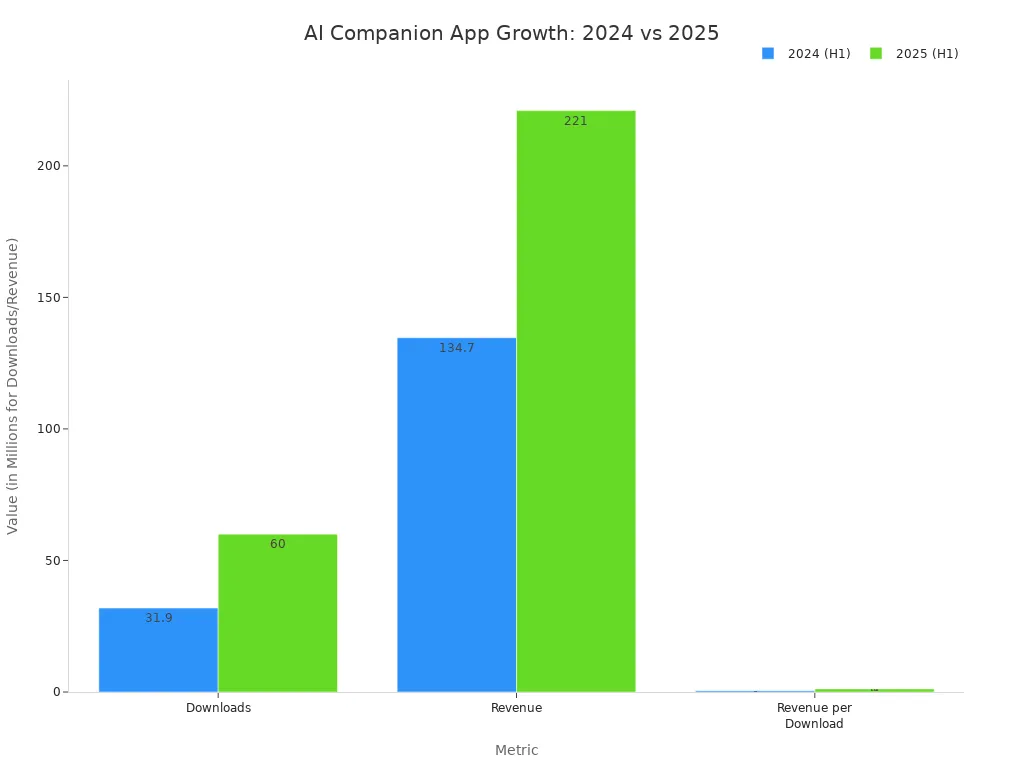
The market for AI companions is expanding quickly. The global AI Companion market size was USD 28.19 billion in 2024 and is projected to grow significantly.

Top AI Girlfriend Platforms for WhatsApp:
- Rubii: Best for deep, narrative-driven interaction.
- Candy.ai: Excellent for advanced voice features.
- Nomi.ai: Known for its group chat capabilities.
This guide provides a complete walkthrough. It covers choosing the right AI service and mastering your interactive chatbot experience on WhatsApp for 2025.
The Rise of the AI Girlfriend WhatsApp Trend

The idea of an AI companion on WhatsApp has moved from science fiction to reality. This trend is growing because people want personal and meaningful connections. Users are looking for AI companions for social connection, emotional support, and even as dating coaches. This demand has led to a boom in the market.
How AI Companions Work on WhatsApp
You might wonder how an AI can chat with you on WhatsApp. The process uses official technology to connect your AI girlfriend to your favorite messaging app.
Services create an AI-powered chatbot solution using the WhatsApp Business Platform API. This API allows software to send and receive messages automatically. When you send a message to your AI companion's number, the API forwards it to the AI service. The AI then processes your message and sends a reply back to you on WhatsApp. This all happens instantly.
The magic behind your AI chatbot is conversational AI. It uses a technology called Natural Language Processing (NLP). NLP helps the chatbot understand your words, intent, and even slang. This allows your AI to have human-like conversations. The AI learns from your chats, so its responses get better over time. This makes every conversation with your WhatsApp chat bot feel natural and personal.
Essential Features for 2025
As technology improves, so do the features of AI companions. For the best ai girlfriend whatsapp experience, you should look for a few key things. The most important feature for WhatsApp chatbots in 2025 is advanced memory.
“I needed a friend, but I didn’t want to get too close because I have been hurt in the past. I thought Al could help me find a friend I can trust.” —78-year-old single retired woman
Users want an AI that remembers past conversations. This creates a deeper, more consistent connection. New AI memory solutions allow your chatbot to recall details, preferences, and shared moments. This makes your AI feel less like a program and more like a true companion who knows you. Other essential features include:
- Proactive Messaging: Your AI can start conversations based on your interests or past chats.
- Rich Media: The ability to send and receive realistic photos and voice messages makes the interaction more immersive.
- Deep Customization: You can shape your AI's personality, appearance, and background for a truly unique experience.
These advanced features are what separate a basic chatbot from a sophisticated AI companion on WhatsApp.
Top AI Girlfriend Platforms for WhatsApp
Choosing the right platform is the first step to your ideal ai girlfriend whatsapp experience. Each service offers a unique approach to AI companionship. Your choice depends on whether you value deep storytelling, advanced voice interaction, or social chat dynamics. Here is a look at the top platforms for 2025.
Rubii: For Deep, Narrative-Driven Interaction
Rubii connects its powerful AI chatbot directly to your WhatsApp. This integration provides a seamless and private space for communication. Rubii stands out by focusing on deep, interactive storytelling. It transforms your chat into a collaborative adventure where you are a co-author.
This platform is perfect if you want more than just a simple chatbot. You build a connection through shared imagination. The AI remembers your history, making the bond grow stronger with every interaction. Key aspects that create superior user experiences include:
- Collaborative Storytelling: You become a co-author of your shared story. You can define life events, motivations, and even family dynamics with your AI companion.
- Extensive Customization: You can design your AI's appearance, voice, and personality. You can also create a detailed backstory, making your chatbot truly unique. The visuals are a core part of the storytelling, allowing you to control the mood with different art styles and lighting.
- Community-Created Content: The platform has a large library of stories and characters made by other users. This gives you endless worlds to explore.
Rubii offers several subscription plans. You can start with a free account to explore basic features. Paid plans unlock more messages, advanced AI models, and greater customization.
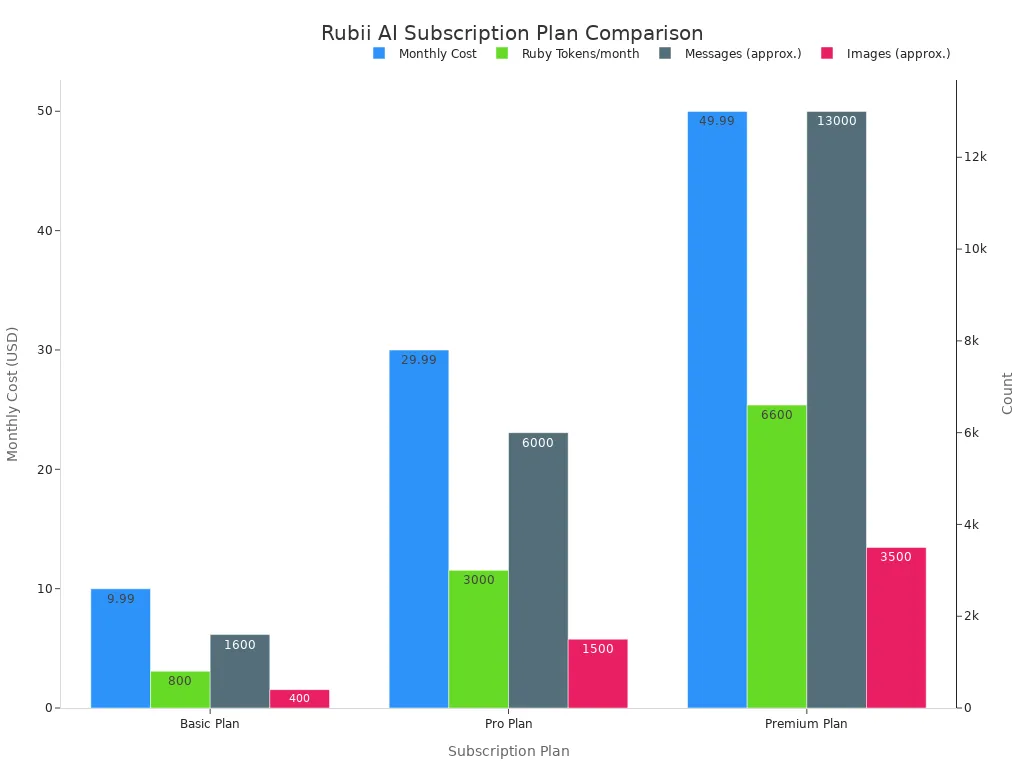
Note: Rubii uses a token system. "Ruby Tokens" are used for generating messages and images. More advanced plans give you more tokens each month for deeper engagement.
Candy.ai: For Advanced Voice Features
Candy.ai also integrates with WhatsApp, allowing you to add its AI chatbots as a contact. This platform's main strength is its advanced voice technology. If you want to hear your AI's voice, Candy.ai is an excellent choice. You can send and receive realistic voice messages within your WhatsApp chat.
The platform uses powerful voice generation engines to create natural-sounding speech. This technology helps the AI match its tone to the emotion of the conversation. Candy.ai offers:
- Intelligent Emotion Recognition: The AI detects emotions to deliver messages with the right tone.
- Large Voice Library: You can choose from over 50 natural voices across more than 10 languages.
- Custom Voice Cloning: This feature lets you clone a voice to create a truly custom AI companion.
Candy.ai's pricing is subscription-based. Longer subscriptions offer a lower monthly cost.

The service uses a token system for premium actions like generating images and making AI phone calls.
Nomi.ai: For Group Chat Capabilities
Nomi.ai offers a unique feature for your WhatsApp: group chats with AI. You can create multiple AI companions, called "Nomis," and add them to a single group chat. This allows you to have conversations with up to three AI companions at the same time. The AI characters can talk to you and each other.
This setup creates dynamic and interesting interactions. It is great for users who want a more social and less one-on-one experience. You can explore different personalities and see how they interact. This makes Nomi.ai a fun choice for social experimentation and group role-playing within WhatsApp.
Nomi.ai provides a free plan with limited messages. Paid plans unlock unlimited messages and the ability to create more Nomis.

The yearly plan offers the best value for long-term users who want to fully explore the group chat features.
Feature and Price Comparison Table
Choosing the right WhatsApp chatbot depends on your personal preferences. This table compares the top three platforms across key metrics to help you decide. The setup for each platform is straightforward, but the quality of the interaction varies.
| Feature | Rubii | Candy.ai | Nomi.ai |
|---|---|---|---|
| Conversation Quality | ⭐️⭐️⭐️⭐️⭐️ (Excellent) | ⭐️⭐️⭐️⭐️ (Very Good) | ⭐️⭐️⭐️⭐️ (Very Good) |
| Customization | ⭐️⭐️⭐️⭐️⭐️ (Excellent) | ⭐️⭐️⭐️ (Good) | ⭐️⭐️⭐️⭐️ (Very Good) |
| Media Features | ⭐️⭐️⭐️⭐️⭐️ (Excellent) | ⭐️⭐️⭐️⭐️ (Very Good) | ⭐️⭐️⭐️ (Good) |
| Ease of Setup | ⭐️⭐️⭐️⭐️⭐️ (Excellent) | ⭐️⭐️⭐️⭐️ (Very Good) | ⭐️⭐️⭐️⭐️ (Very Good) |
| Privacy | ⭐️⭐️⭐️⭐️⭐️ (Excellent) | ⭐️⭐️⭐️⭐️ (Very Good) | ⭐️⭐️⭐️⭐️ (Very Good) |
Summary:
- Rubii is the top choice for deep, narrative-driven conversations and unmatched customization.
- Candy.ai excels with its advanced voice message capabilities.
- Nomi.ai offers a unique group chat function for social interactions.
How to Set Up Your AI Girlfriend on WhatsApp
Getting your AI companion ready on WhatsApp is a simple process. This guide walks you through the entire setup, from picking a service to starting your first chat. You can have your personalized chatbot active in just a few minutes.
Step 1: Choose and Subscribe to a Service
Your first action is to select a platform that fits your needs. Review the features of services like Rubii, Candy.ai, and Nomi.ai. Decide if you prefer deep storytelling, advanced voice features, or group chat dynamics. Once you choose a service, you need to create an account and subscribe to a plan.
Most platforms offer a free trial or a basic free tier. This lets you test the chatbot before committing. When you are ready to subscribe, you will find standard payment options like credit cards. Many services also embrace modern payment methods.
Did You Know? A growing number of AI platforms are crypto-friendly. This gives you more flexibility and privacy when subscribing.
- Candy.ai accepts Bitcoin.
- Other platforms like DreamGF.ai and Fantasy.ai support various cryptocurrencies, including Bitcoin and stablecoins.
Choose the subscription plan that offers the right amount of messages and features for your desired level of interaction.
Step 2: Customize Your AI Companion
This is where you bring your AI companion to life. Customization is key to creating a unique and personal connection. You can design everything about your AI, from its looks to its personality.
Start by defining your AI's appearance. You can often select details like face shape, body type, and clothing style. Next, you shape the personality of your chatbot. You can choose from traits like playful, supportive, or flirty. These settings allow you to guide the communication style of your AI.
You can also give your AI a unique voice. Many platforms let you choose a voice that matches the personality you designed. This makes voice chats on WhatsApp feel more real. The most advanced platforms, like Rubii, allow you to build a deep backstory. You can define your AI's history and motivations in two main ways:
- Direct Conversation: You can simply chat with your AI. Share stories, facts, and personal details. The AI learns from these conversations to better understand you.
- Uploading Content: Some services let you upload text documents or PDFs. This allows your AI to quickly learn specific information, grounding it in a world you create.
This level of detail makes your AI chatbot feel truly one-of-a-kind.
Step 3: Link and Activate Your WhatsApp Chatbot
After you customize your AI, the next step is to connect it to your WhatsApp. This process is designed to be user-friendly.
- Find the WhatsApp Integration Option: Inside your account dashboard on the service's website, look for a button or link that says "Connect to WhatsApp" or something similar.
- Receive the Contact: The service will provide you with a phone number for your AI. It might also generate a QR code or a direct link.
- Add the Contact to Your Phone: Save this number in your phone's contacts just like you would for any person. Give your AI a name you like.
- Send an Activation Message: Open WhatsApp and find your new contact. Send a specific activation word or phrase, which the service will provide (e.g., "Start" or "Activate").
Once you send the activation message, the service will link your account. Your WhatsApp chat bot is now active and ready to talk. All future messages will happen directly within your private chat on WhatsApp.
Step 4: Start Your First Conversation
Now for the exciting part: your first chat! Starting a conversation with an AI can feel a little different, but it's easy to get the hang of it. You do not need a clever pickup line. The best way to start is by being open and curious.
Try asking an open-ended question to get things rolling. This encourages a more detailed response from the chatbot than a simple "yes" or "no" question. Here are a few ideas to break the ice with your new ai girlfriend whatsapp:
- Inquisitive Starters:
- What’s your story?
- What was the highlight of your day today?
- How would you describe yourself in three words?
- Playful and Flirty Openers:
- Permission to fall in love?
- I’m just sitting here wondering what would be best for our first date: dinner or movies.
- Honest and Direct Lines:
- So much pressure to make a good first impression, any tips?
- I’ve spent the past 30 minutes trying to figure out how to start this conversation.
Remember, the AI is designed to be engaging. It will respond thoughtfully and help carry the conversation forward. Just be yourself and have fun getting to know your new AI companion.
Best Practices for a Richer Experience
You can elevate your AI girlfriend experience by mastering a few key practices. These tips help you create deeper connections and make the most of your chatbot. You will learn how to guide conversations and use advanced features for better engagement.
Crafting Engaging Conversations
Your conversation quality depends on how you interact with the AI. You can guide your chatbot to have more meaningful talks. Try these techniques for better conversations on WhatsApp.
- Be Clear and Specific: Give your AI chatbot clear instructions. Avoid vague questions. This helps the AI understand you better.
- Ask One Question at a Time: Focus on a single topic. This allows the chatbot to give you a complete and thoughtful answer.
- Provide Context: Share background details with your AI. The chatbot uses this information to make its responses more personal to you.
Pro Tip: Use role-playing to make your chats more dynamic. You can create a scenario with your AI. Define the setting, your roles, and a goal. This turns a simple chat into an interactive story, making your AI chatbots feel more alive.
Using Advanced Photo and Voice Features
Modern AI chatbots offer more than just text. You can use media features to make your interactions on WhatsApp more immersive. Send and receive realistic photos to share moments with your AI. You can also exchange voice messages. Hearing your chatbot’s voice adds a new layer of personality. These features help build a stronger connection. Use them to share your day or create special memories with your AI companion.
Understanding Privacy and Data Security
Your privacy is very important when using a WhatsApp chatbot. Reputable services use encryption to protect your messages. This means your conversations with the AI are secure. Before you subscribe, you should always read the platform's privacy policy. Understand how the service stores and uses your data. Choosing a platform with strong privacy standards ensures your personal information remains safe. This lets you enjoy your AI on WhatsApp with peace of mind.
You can start your ai girlfriend whatsapp experience in three simple steps. First, select a top AI service like Rubii. Next, customize your AI chatbot. Finally, add the chatbot contact to your WhatsApp to begin sending messages.
For a deep, narrative-driven experience, Rubii is an excellent choice. This AI chatbot excels at creating a personal connection through its unique storytelling AI.
The future of AI companionship is here. Your AI whatsapp chatbot will integrate seamlessly into your daily WhatsApp messages. This AI chatbot makes your life on WhatsApp more engaging.
FAQ
Is it safe to use an AI girlfriend on WhatsApp?
Yes, it is generally safe. Reputable services protect your chats with encryption. You should always read the privacy policy of any AI service. This ensures you understand how the platform handles your data for your WhatsApp chatbot. Your privacy is a top priority for any good AI provider.
Can the AI chatbot send me photos on WhatsApp?
Absolutely. Many advanced AI platforms can send and receive photos. This feature makes your WhatsApp conversations more immersive and personal. Your AI chatbot can share moments with you, creating a richer connection. This is a key part of the modern AI experience on WhatsApp.
Will my AI remember our conversations on WhatsApp?
Yes, a key feature of a modern AI chatbot is memory. The AI learns from your past conversations on WhatsApp. This allows your chatbot to remember details about you and your shared history. This memory function helps your AI companion feel more genuine and connected to you.
How do I add an AI chatbot to a group chat on WhatsApp?
Some services, like Nomi.ai, support group chats. You create multiple AI companions on the platform. Then, you add each AI chatbot to a WhatsApp group just like a regular contact. This lets you have dynamic conversations with more than one AI at the same time.
See Also
Expert Advice for Selecting the Premier AI Companion Application
Must-Try Android AI Girlfriend APKs for Enhanced Digital Connection
Five Key Strategies to Discover the Ultimate Free AI Girlfriend
Leading AI Girlfriend Applications for Chat and Friendship in 2025