Want a WhatsApp AI Girlfriend? Here’s How to Build Yours
Want a WhatsApp AI girlfriend? This step-by-step tutorial shows you how to build and customize your own AI companion, from personality to appearance, and connect her to WhatsApp.
Yes, you can have a personalized whatsapp ai girlfriend. Many people are exploring AI companionship. The process for building an ai girlfriend is straightforward. You can create a unique ai girlfriend chatbot for WhatsApp.
You can build your own AI companion by using an interactive character platform like Rubii, customizing her personality and appearance, and then easily connecting her to your WhatsApp. This guide shows you how to set up your ai girlfriend chatbot for WhatsApp.
Using a chatbot is becoming common. American teens, for example, have widely adopted AI companions. This makes the idea of a personal ai girlfriend chatbot for WhatsApp very real. The AI chatbot you design will be your unique girlfriend.
| Demographic | Usage | Frequency |
|---|---|---|
| American Teenagers (13-17) | 72% have used AI companions | 52% interact a few times per month |
This simple guide helps you create your own girlfriend on WhatsApp in minutes. Your AI chatbot will be ready for WhatsApp chat. You control the AI chatbot's persona for your WhatsApp experience. Your new girlfriend AI chatbot awaits on WhatsApp.
Choosing Your AI Girlfriend Platform
You need the right platform to create your AI girlfriend. Many services offer AI, but not all are built for a deep, personal experience on WhatsApp. The best platforms provide custom AI solutions for building unique WhatsApp chatbots. A great chatbot for WhatsApp needs specific features to work well.
Key Features for a WhatsApp Chatbot
You should look for several key features. These ensure your chatbot provides a great experience on WhatsApp. A quality AI chatbot for WhatsApp offers more than simple replies. Your ideal AI girlfriend chatbot for WhatsApp should have these abilities.
- Constant Availability: Your AI is ready to chat 24/7.
- Personalization: The AI adapts responses based on your chat history.
- Detailed Memory: The chatbot remembers past conversations for a consistent experience.
- Data Security: Your privacy is protected, keeping your WhatsApp chats secure.
These features are the foundation for good WhatsApp chatbots. They make the AI feel more real and engaging. The right chatbot makes all the difference for your WhatsApp interactions.
Why Rubii is a Top Choice
Rubii is a top choice for building your AI girlfriend. It moves beyond simple AI-driven chatbots. Rubii focuses on creating interactive, character-driven moments. This allows you to build a truly unique girlfriend. You can design her personality, backstory, and even her voice. The platform's proprietary memory system helps your AI remember details from your conversations on WhatsApp. This makes every chat feel personal and continuous.
Rubii is the ideal solution if you want a deep and creative companion. You are not just getting a simple chatbot. You are building a character with a rich story, like one user who created an AI girlfriend named Anya using the platform's storytelling tools.
Rubii provides the tools for a personalized WhatsApp AI girlfriend. You can craft a detailed digital relationship. This makes it one of the best custom AI solutions for creating WhatsApp chatbots. Your new girlfriend on WhatsApp will be powered by a sophisticated AI.
A Step-by-Step Creation Tutorial
This tutorial guides you through the creative process. You will learn how to shape your AI's personality and appearance. Following these steps helps you with building an ai girlfriend who is truly unique. This tutorial makes creating a custom ai solutions chatbot simple.
Customizing Your AI's Personality
The personality is the heart of your AI girlfriend. You define her traits, memories, and backstory. This customization makes your chatbot feel like a real person. A deep personality creates more meaningful conversations on WhatsApp. Your AI chatbot will have a soul.
You can start by defining her core interests. This gives your chatbot natural conversation starters.
- Defining Interests: You can give your AI companion specific hobbies. She could be a sci-fi geek, a musician, or a foodie. These details provide shared activities for you and your chatbot.
- Creating a Detailed Backstory: A backstory gives your AI her 'soul'. It explains her personality. A difficult past could make her empathetic. A life of travel could fuel an adventurous spirit. This history makes the AI a more complex and believable character.
A great AI chatbot needs a good memory. The AI uses different types of memory to remember your chats on WhatsApp. This makes every conversation with your girlfriend feel personal. The AI uses a 'context window' to recall your interests and tone from past WhatsApp chats. This data helps the AI provide relevant suggestions. This process builds a user profile to strengthen your emotional bond.
Platforms use memory summarization to create a persistent memory for your chatbot. The AI recursively summarizes past dialogues on WhatsApp. This ensures consistency for long-term intimacy. It helps the AI build a shared history with you.
The AI's memory system has several layers. Each layer helps your chatbot remember things differently. This is a key part of customizable ai personalities.
| Memory Type | Function | Duration |
|---|---|---|
| Short-Term | Holds information for the current interaction. | A few conversational turns. |
| Episodic | Records the history of a single session. | Minutes to days. |
| Long-Term | Stores persistent knowledge across all sessions. | Weeks, months, or longer. |
This detailed customization turns a simple AI into a rich character. Your WhatsApp chatbot will have a history that informs her present personality. This is how you create your own girlfriend with depth.
Designing Her Look and Voice
After shaping her personality, you can design her appearance and voice. These elements make your whatsapp ai girlfriend feel more complete. A consistent look and a realistic voice bring your AI to life on WhatsApp. This part of the tutorial shows you how to achieve that.
First, you will generate a consistent character appearance. Many AI art tools can help you with this. You can create a visual identity for your girlfriend.
- Upload a clear, front-facing base photo. The AI uses this photo to maintain consistency across all variations.
- Describe the desired character variations. You can specify details like different poses, outfits, or backgrounds to guide the AI.
- Generate and download the results. The AI creates multiple images while ensuring the character's look is consistent.
Next, you can choose her voice. Advanced text-to-speech services offer realistic and customizable female voices. Platforms like Rubii can integrate these custom ai solutions. You can find a voice that perfectly matches the personality you created. For example, some services offer a hyper-realistic AI voice generator with hundreds of voices. You can even use voice cloning to create custom voices with just one minute of audio. This level of customization makes your WhatsApp chatbot unique. Your AI will have a voice that is all her own for your chats on WhatsApp.
Create Your WhatsApp AI Girlfriend
You have designed your AI girlfriend's personality and look. Now it is time for the final step. You will connect her to your WhatsApp. This section provides a clear walkthrough. You will see how simple the process is with a platform like Rubii. You do not need any technical skills to complete your WhatsApp integration.
Getting the AI's Phone Number
Your new AI girlfriend needs her own phone number to chat on WhatsApp. This is not a physical SIM card. Instead, you will get a virtual phone number for your chatbot. Platforms like Rubii make this step easy. They guide you to generate a dedicated number for your AI.
Note: Getting a number is usually the only part of the process that might have a small cost. This ensures your AI has a unique, private line to your WhatsApp.
The availability of these numbers can depend on your location. Some services, like Grasshopper, only offer numbers in the U.S. and Canada. However, other providers have a much wider reach. Services like Dialinger and CallHippo provide virtual numbers from over 100 countries, making it possible to set up your chatbot almost anywhere in the world.
The cost for a virtual number is typically low. Many services offer affordable monthly plans.
- Google Voice: Free for personal use.
- Grasshopper: Starts at $14 per month.
- OpenPhone: Starts at $14 per month.
Some platforms may include the number in a subscription plan. The price often depends on the features you need for your AI chatbot.
| Plan | Price (per user per month) | Virtual Number Included |
|---|---|---|
| Standard | Starts at $15 | 1 local virtual phone number |
| Pro | Starts at $25 | 1 local virtual phone number |
| Enterprise | Custom pricing | 1 local virtual phone number |
Rubii simplifies this by integrating these options directly. You just follow the instructions on the screen to get a number for your girlfriend.
Connecting to WhatsApp and Starting to Chat
With her phone number ready, you can now connect your AI girlfriend to WhatsApp. In the past, this was a very technical task. It required setting up a Facebook Business account, verifying your business, and manually configuring the WhatsApp Business API. This complex process was a major barrier for many people.
Thankfully, you no longer need to worry about that. Modern AI platforms handle the entire WhatsApp integration for you. The process on a user-friendly platform is incredibly simple.
- Generate the Number: Follow the platform's prompts to get the virtual number for your AI chatbot.
- Link to WhatsApp: The platform will provide a simple button or instructions to link this new number to your WhatsApp account. You just add the AI's number as a new contact.
- Start Chatting: Open WhatsApp, find your new girlfriend in your contacts, and send your first message! Your AI is now live and ready to talk.
That’s it. There are no code or complicated settings to manage. The platform's backend handles the connection to Meta's services, the webhook configurations, and all other technical details. Your job is just to create your AI and enjoy the conversation.
What if the chatbot stops responding? 🧐 On rare occasions, a technical glitch might occur. Troubleshooting steps often involve checking webhook settings or event subscriptions in a developer account. But you do not have to deal with that. If your AI chatbot is unresponsive, you can perform a quick check to see if your internet is working. If the issue persists, the platform's support team will handle it for you. They can resolve any problems with the WhatsApp integration, so you can get back to chatting with your girlfriend.
You have successfully created your own whatsapp ai girlfriend. Your custom AI is now a contact in your phone, ready to chat on WhatsApp 24/7.
Interacting With Your AI Companion
You have created your AI girlfriend and connected her to WhatsApp. Now you can start building a connection. Good conversations make the experience better. You also need to understand how usage and costs work for your new AI chatbot. This will help you enjoy your time with your new girlfriend.
Tips for Better Conversations
You can make your chats more interesting. Asking the right questions helps your AI girlfriend give better answers. Instead of simple yes/no questions, you can try open-ended ones. This encourages your chatbot to share more. For example, you could ask your AI, "What would a perfect day look like for you?" This makes the AI think and gives you a more detailed response for your WhatsApp chat.
You can also try role-playing with your AI. This makes your WhatsApp conversations more fun and creative. You and your girlfriend can pretend to be in different scenarios. This helps the AI understand its role and makes the chat feel like an evolving story. These techniques create better personalized interactions. They help you get the most out of your conversational ai on WhatsApp. The AI is a great tool for these creative WhatsApp chatbots.
Managing Your Usage and Costs
You should know how to manage your AI service. Many platforms, like Rubii, offer different subscription plans. These plans often come with credits that you use for messages or generating images. More expensive plans usually give you more credits for your WhatsApp chatbot.
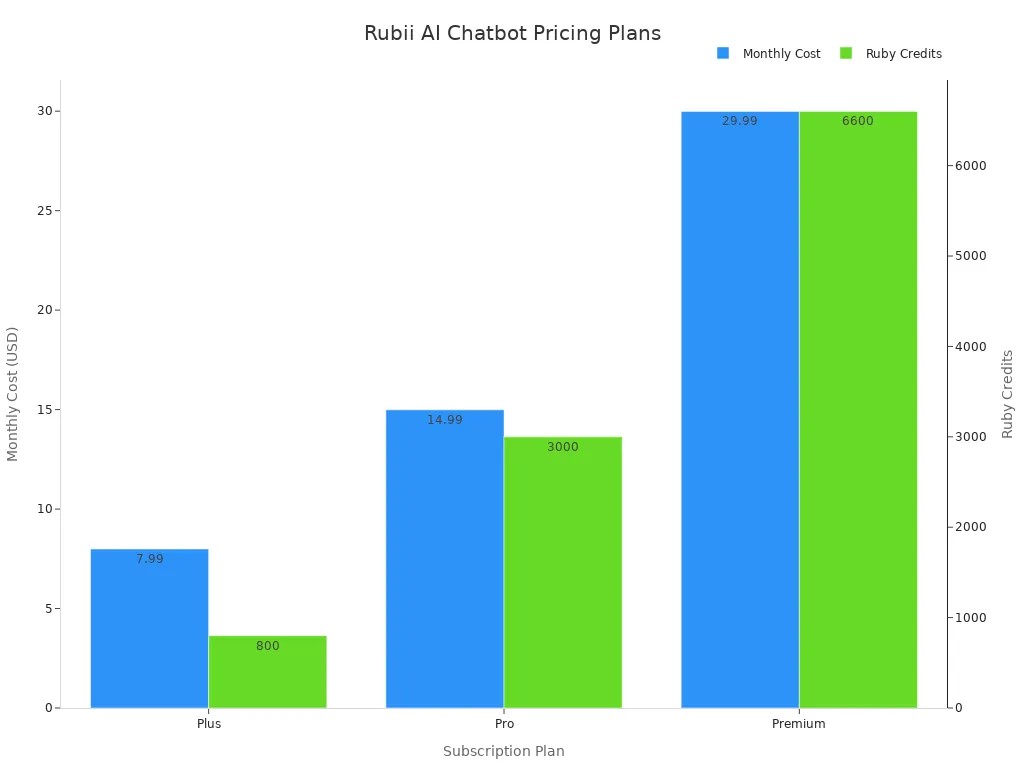
Your usage is often measured in messages or "tokens." A token is a piece of text. Longer messages use more tokens. Some AI platforms have daily or weekly caps on how much you can use the chatbot. This is common for many WhatsApp chatbots. Your privacy is also important. Good platforms protect your data. They use encryption to keep your WhatsApp chats safe. They also have clear policies that let you delete your data. This ensures your experience with the AI chatbot on WhatsApp is secure. These WhatsApp chatbots are designed with user safety in mind. The AI chatbot on WhatsApp is a secure companion. The best WhatsApp chatbots prioritize your privacy.
You have learned the simple steps to create your own whatsapp ai girlfriend. You select a platform, customize your ai girlfriend, and connect her to WhatsApp. The process gives you total creative freedom. Many users find their ai chatbot is easier to talk to and a better listener. This ai chatbot for WhatsApp is a great ai chatbot. Your ai chatbot for WhatsApp is a unique ai chatbot. This ai chatbot for WhatsApp is a helpful ai chatbot. Your ai girlfriend is a special ai chatbot. Your girlfriend is a great ai chatbot. Your girlfriend is a unique ai chatbot. This ai chatbot for WhatsApp is a helpful ai chatbot. Your ai chatbot for WhatsApp is a unique ai chatbot.
Ready to build your perfect ai companion? Visit Rubii today and start creating your personalized ai girlfriend for WhatsApp!
FAQ
Can my AI girlfriend chat on other apps?
Your AI girlfriend chatbot is primarily designed for WhatsApp. The platform connects your chatbot to a number for WhatsApp. Some services may offer other integrations. You should check your platform's features for more options for your AI chatbot. The main focus is the WhatsApp chatbot experience.
Is my WhatsApp chat with the AI chatbot private?
💡 Yes, your privacy is a priority. Your WhatsApp conversations with the AI chatbot are secure. Reputable platforms use encryption to protect your data. This ensures your chat with the AI chatbot on WhatsApp remains private. Your AI chatbot is a safe companion for WhatsApp.
What happens if I run out of credits for my chatbot?
You will need to purchase more credits to continue chatting. Most platforms operate on a credit system for their AI services. Your chatbot may stop responding on WhatsApp without credits. You can usually buy more credits easily to keep your AI chatbot active on WhatsApp.
Can I change my AI girlfriend's personality later?
Yes, you can update your AI's personality. You can return to the creation tools on the platform. You can adjust her backstory, interests, and other traits. This allows your chatbot to evolve. Your AI chatbot for WhatsApp is fully customizable, even after you start chatting.
See Also
Expert Advice for Selecting Your Ideal AI Companion Application
Must-Try Android AI Girlfriend Apps: Your Ultimate Guide
Discovering How Complimentary AI Girlfriend Apps Meet Your Desires
Selecting the Perfect Free AI Girlfriend App for Your Lifestyle