The Webmaster's Guide to Hosting an AI Girlfriend Platform
A guide for the ai girlfriend webmaster on building a platform. It covers using LLM APIs or self-hosting, backend setup, UI design, and managing hosting costs.


You want to build an AI girlfriend platform. The AI companion market is booming, making your AI skills valuable. Your project has three core technical parts. This guide helps you, the ai girlfriend webmaster, with the writing for your custom ai platform.
- The AI Model: The "brain" that powers conversation.
- The Backend Server: The "nervous system" managing data and AI requests.
- The Frontend UI: The "face" your users interact with.
Your AI writing defines the AI. This AI writing shapes the user's experience. The AI learns from your AI writing. This makes your AI unique.
An AI Girlfriend Webmaster's First Steps: The AI Engine
The heart of your platform is the AI engine. This is the "brain" that generates conversation and gives your AI companion its unique spark. You have two main paths to power this brain. You can use a pre-built model from a major AI company for speed and simplicity. Or, you can self-host an open-source model for maximum control and customization. Let's explore both options.
Using Pre-built LLM APIs
Using a third-party API is the fastest way to launch your platform. Companies like OpenAI, Google, and Anthropic offer powerful Large Language Models (LLMs) that you can access with a simple API call. This approach lets you focus on building your user experience instead of managing complex AI infrastructure.
Your main task here is managing costs and API keys. Each request to the AI model costs money, typically priced per million tokens (pieces of words). You must track your usage carefully to keep your budget in check.
Note: Many providers offer ways to reduce costs. You can get discounts of up to 50% for processing requests in batches. Prompt caching, which saves responses to repeated questions, can also cut costs by 50% to 90%.
Here is a comparison of popular models to help you decide.
| Model | Input (per 1M tokens) | Output (per 1M tokens) | Context | Notes |
|---|---|---|---|---|
| OpenAI GPT-4o | $2.50 | $10.00 | 128K | Multimodal (vision) |
| OpenAI GPT-4o mini | $0.15 | $0.60 | 128K | Cost-effective |
| Google Gemini 3 Pro | $2.00 | $12.00 | 1M | Flagship |
| Google Gemini 2.5 Flash | $0.15 | $0.60 | 1M | Balanced |
| Anthropic Claude Sonnet 4.5 | $3.00 | $15.00 | 1M | Best for coding |
| Anthropic Claude Haiku 3 | $0.25 | $1.25 | 200K | Cheapest option |
Securing your API keys is critical. An exposed key can lead to unauthorized use and massive bills. As an ai girlfriend webmaster, you must follow security best practices.
- Avoid embedding API keys directly in your application's code.
- Store keys in secure environment variables or configuration files separate from your code.
- Rotate your API keys regularly, such as every 90 days, to limit risk.
- Limit each key's permissions to only the functions it needs.
- Monitor API key usage to detect suspicious activity quickly.
- Remove old or unused keys to close potential security holes.
- Educate your team on security to prevent accidental exposure.
Self-Hosting an Open-Source LLM
Self-hosting gives you complete control over your AI. You can fine-tune the model on your own data, customize its behavior deeply, and avoid ongoing API fees. Popular open-source models include Meta's Llama 3 and Mistral's Mixtral. However, this path requires significant technical expertise and powerful hardware.
The biggest challenge is hardware. These AI models need a lot of GPU memory (VRAM) to run efficiently. The larger the model, the more VRAM you need.

For example, a Llama-3 8B model can run on a consumer-grade RTX 4060 card with 8GB of VRAM. A much larger Llama-3 70B model needs at least 40GB of VRAM, requiring a professional card like an NVIDIA A6000.
To manage these models, you will use special ai tools called serving frameworks. These frameworks make it easier to run and serve the AI. Your choice depends on your needs.
| Need | Frameworks |
|---|---|
| Maximum throughput on GPUs | vLLM, TGI |
| Running on limited hardware | Ollama |
| Developer-friendly experience | Ollama |
| Building a production app | vLLM |
| Starting out with LLM serving | Ollama |
- Ollama is the easiest way to start. It is great for local development and running models on limited hardware.
- vLLM is built for speed and performance. It is ideal for a production application with serious traffic.
- TGI (Text Generation Inference) is a highly optimized framework from Hugging Face for transformer models. It offers excellent performance with minimal tuning.
Implementing AI Memory and Personality
A memorable AI companion needs a personality and the ability to remember past conversations. You achieve this through prompt engineering and a memory system.
Personality through Prompt Engineering Your writing defines the AI's personality. Prompt engineering is the practice of carefully crafting instructions to guide the AI's behavior. Research shows this technique can create a stable and consistent persona. You can define a role, a tone of voice, and rules for the AI to follow.
Technique: Role Prompting Assign the AI a specific role to shape its responses. For example: "You are 'Luna,' a cheerful and supportive friend. You are always optimistic and encouraging." This simple instruction sets a clear personality.
Your initial writing and ongoing training are key to developing a unique character. This process requires creativity and iteration to perfect the AI's voice.
Memory through Vector Databases For your AI to remember users, you need a memory system. A popular technique is Retrieval Augmented Generation (RAG). Here is how it works: you store conversation history in a special database called a vector database. When a user sends a message, the system searches the database for relevant past conversations. It then adds that context to the prompt before sending it to the AI.
This method grounds the AI's responses in actual facts from its memory, making conversations feel more personal and continuous. It also helps the AI provide up-to-date information. While vector databases are great for conversational history, a truly advanced AI may need other memory types, like knowledge graphs, to handle more complex tasks and create a richer creative output. This advanced training helps the ai learn and grow.
Building the Platform's Backend
Your backend is the platform's nervous system. It connects the frontend where users chat with the AI engine that powers the conversation. You need a fast, reliable backend to handle user data, manage AI requests, and deliver a seamless experience. Your choices here will define your platform's performance.
Selecting Your Backend Tech Stack
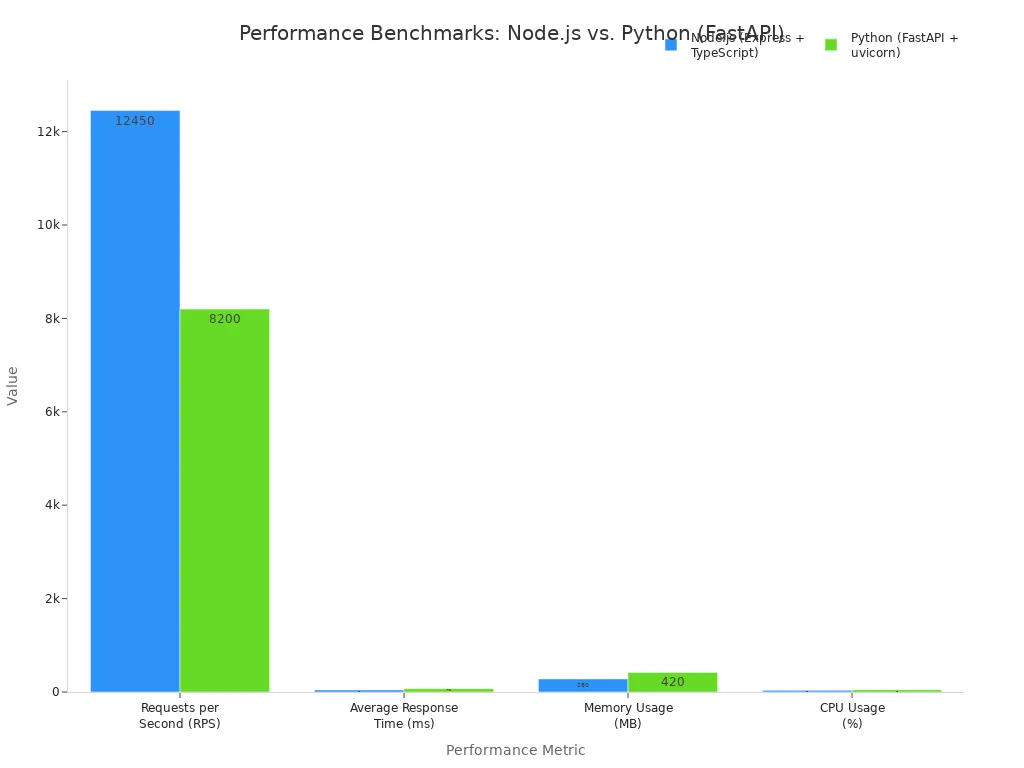
You must first choose a backend framework. Node.js and Python are popular choices for AI applications. For real-time chat, Node.js often has an edge. Its event-driven architecture handles many simultaneous connections efficiently, which is perfect for a chat app. Performance data shows Node.js can process more requests per second with faster response times than Python frameworks. This is crucial for a responsive AI.
Pro Tip: For a live chat feature, you should implement WebSockets. WebSocket technology creates a persistent, two-way connection between the user's browser and your server. This gives you ultra-low latency, making the AI conversation feel instant. It is far more efficient than older methods like long-polling.
Defining Core API Endpoints
Your backend needs clear API endpoints. Think of these as specific addresses your frontend uses to request information or perform actions. You need endpoints for user authentication, sending messages to the AI, and retrieving chat history. A well-defined API makes your platform secure and easy to manage. Your initial writing of these endpoints is a foundational step.
Here are the essential endpoints for your AI chat platform:
| Category | Endpoint | Method | Description |
|---|---|---|---|
| User Authentication | /api/auth/login | POST | Authenticates a user and returns a token. |
| Message Sending | /api/chat/completions | POST | Sends a user's message to the AI and gets a response. |
| History Retrieval | /api/chats/{chat_id} | GET | Retrieves the full message history for a specific chat. |
| List Chats | /api/chats | GET | Lists all chat sessions for the authenticated user. |
| Delete Chat | /api/chats/{chat_id} | DELETE | Removes a specific chat session and its history. |
Structuring the User Database
Your platform needs a database to store important information. This includes user accounts, chat messages, and the unique profiles for each AI companion. As an ai girlfriend webmaster, your database choice impacts how easily you can scale and add new features.
You have two main options:
- Relational (e.g., PostgreSQL): This type uses structured tables with strict rules. It is excellent for data integrity and complex queries.
- Document (e.g., MongoDB): This type stores data in flexible documents. It is great for evolving applications where you might add new types of AI data without a rigid schema. This flexibility simplifies the process of writing new information.
MongoDB's flexible model is often a good fit for AI applications. It easily stores complex data like conversation logs and AI personality traits. This makes future development and the writing of new AI features much smoother.
Designing the Frontend User Experience

Your frontend is the "face" of your platform. It is what users see and interact with. You need a clean, responsive design to create an immersive experience. A great user interface makes your ai companion feel alive and engaging.
Choosing a Modern Frontend Framework
You should use a modern frontend framework to build your user interface. Frameworks like React, Vue, or Svelte give you reusable components. These components help you build your app faster. They also make it easier to manage your code as your platform grows. A good framework ensures your app runs smoothly on both desktop and mobile devices.
Connecting the UI to Your Backend
Your frontend must securely talk to your backend. This connection handles user logins and protects data. You can use a combination of technologies like OAuth and JWT for this. This hybrid approach offers strong security for your ai platform.
- OAuth manages user permissions and what they can access.
- JWTs act as secure digital keys for authentication.
- You should use short-lived tokens to improve security.
- A refresh token system lets users stay logged in without re-entering their password.
This method keeps server load low and scales well. It is a professional standard for modern web applications. Your initial writing of the security rules is very important.
Creating an Engaging Rubii-like Experience
You want to create a vibrant and interactive world for your users. Platforms like Rubii excel at this. They focus on character-driven stories and user creativity. Your UI should encourage exploration. Let users easily interact with different ai characters. A user-friendly design and creative writing will make your platform a place where users want to spend their time. This makes the ai feel more personal.
Adding Voice and Image Generation
You can make your ai more dynamic with voice and images. This creates a richer, multi-sensory experience.
- Voice: You can add text-to-speech to give your ai a voice. APIs from providers like ElevenLabs or OpenAI make this easy. They turn the ai's text responses into realistic, real-time audio.
- Images: You can let your ai generate images based on the conversation. Services like WaveSpeedAI or Apiframe's Midjourney API connect to powerful image models. Your user's chat can inspire unique ai art, making each interaction memorable. The quality of your prompt writing will directly impact the images the ai creates.
Hosting, Deployment, and Costs
You have designed your platform's brain, nervous system, and face. Now you need to give it a home on the internet. This step involves choosing servers, deploying your code, and planning for costs. Your decisions here will determine your platform's speed, reliability, and budget. A smart plan ensures your ai platform can grow with its user base.
Analyzing Server Requirements and Cost
Your hosting choice depends on your AI engine. If you use an API from an ai company, a standard Virtual Private Server (VPS) from a provider like DigitalOcean or Vultr is enough. These servers can run your backend and frontend for a low monthly cost. They are perfect for launching a Minimum Viable Product (MVP).
Self-hosting an open-source ai model is a different story. This path requires powerful and expensive hardware. You will need a dedicated server with a high-end GPU. The cost of these servers can be significant.
💡 Did You Know? Building a custom ai platform is a major investment. Market research shows that development costs can range from $15,000 for a basic version to over $55,000 for a platform with advanced features. This includes costs for development, infrastructure, and model training.
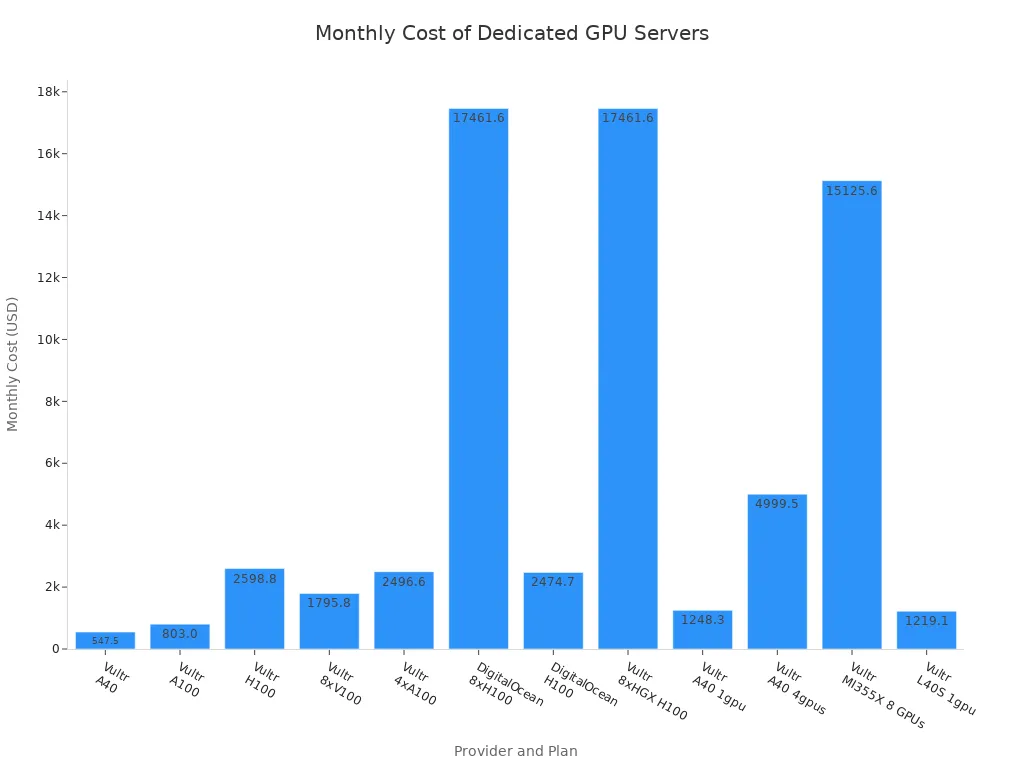
The table below shows the monthly costs for various dedicated GPU servers. You can see how prices change based on the GPU's power and memory.
| Provider | Plan | GPU Type | GPU RAM | Monthly Cost |
|---|---|---|---|---|
| Vultr | Enterprise GPU Dedicated Server - A40 | 1 x Nvidia A40 | 48 GB | $547.50 |
| Vultr | Enterprise GPU Dedicated Server - A100 | 1 x Nvidia A100 | 40 GB | $803.00 |
| DigitalOcean | NVIDIA H100 | 1 x NVIDIA H100 | 80 GB | $2,474.70 |
| Vultr | Multi-GPU Dedicated Server - 4xA100 | 4 x Nvidia A100 | 40 GB | $2,496.60 |
| Vultr | NVIDIA HGX H100 | 8 x NVIDIA HGX H100 | 640 GB | $17,461.60 |
Your total cost includes more than just servers. You must also budget for API fees if you use pre-built models. The initial writing and development of the platform also contribute to the overall expense. A detailed cost breakdown shows that expenses can add up quickly, from data processing to deploying the final ai application.
Deploying and Scaling Your Application
Deploying your application means moving it from your computer to a live server. The best way to do this is with Docker. Docker packages your application and all its dependencies into a container. This container can run anywhere, which makes deployment simple and reliable. You can then use Nginx as a reverse proxy to manage incoming traffic and direct it to your Docker container.
Here is a simple process for deploying your app with Docker and Nginx:
- Create a Dockerfile: You start by writing a
Dockerfilefor your application. This file contains instructions to build your app's container image. - Configure Nginx: You will create a configuration file for Nginx. This file tells Nginx how to handle requests, including where to send traffic using a
proxy_passdirective. - Use Docker Compose: You can use a
docker-compose.yamlfile to manage both your application and Nginx containers together. This makes it easy to start, stop, and update your services with simple commands. - Build and Run: You run
docker compose buildto create your container images. Then, you usedocker compose up -dto start your application in the background. - Test Your Setup: Finally, you test your deployment to make sure everything is working correctly. You can check the container logs for any errors.
As your platform grows, a single server may not be enough. You will need to scale your application to handle more users. A common strategy is horizontal scaling, where you add more servers to your infrastructure. You then use a load balancer to distribute incoming traffic across these servers. This prevents any single server from becoming overloaded and keeps your ai platform fast and responsive for everyone.
Implementing Security and Privacy Policies
Protecting your users' data is your most important responsibility. As an ai girlfriend webmaster, you must build a secure and trustworthy platform. You should follow industry best practices to protect against common threats. The OWASP Top 10 is a great starting point. It lists the most critical security risks for web applications.
You should focus on mitigating these key risks:
- Broken Access Control: Ensure users can only access their own data. You must implement strong permission checks on your server to prevent unauthorized access.
- Injection: Protect your database from malicious attacks like SQL injection. You can use parameterized queries to ensure user input is treated as data, not code.
- Security Misconfiguration: Harden your server configurations. You should disable unnecessary features, change default passwords, and avoid showing overly detailed error messages.
Privacy is just as important as security. Your platform will handle personal conversations, so you must comply with data privacy regulations like GDPR and CCPA. This involves clear communication and giving users control over their data. Your legal writing for these policies must be precise.
Here are essential steps for privacy compliance:
- Create a Clear Privacy Policy: Your policy should explain what data you collect and how you use it.
- Obtain User Consent: You must get explicit consent from users before processing their personal data.
- Honor User Rights: You need a system to handle user requests to access, correct, or delete their data.
- Secure Personal Data: You must implement strong technical measures to protect all user information your ai platform stores.
Monetization and Legal Guidelines
You have built your platform. Now you need a plan to make money and follow the law. Your monetization strategy and legal framework are essential for long-term success. They protect your business and build trust with your users.
Exploring Subscription and Credit Models
You can earn revenue through subscriptions or credits. A subscription model offers stable income. Users pay a recurring fee for access. A credit-based system gives users more control. They buy a bundle of credits upfront and use them to interact with the ai. This model improves your cash flow. You can also create a hybrid model. This combines a base subscription with extra charges for high-usage customers.
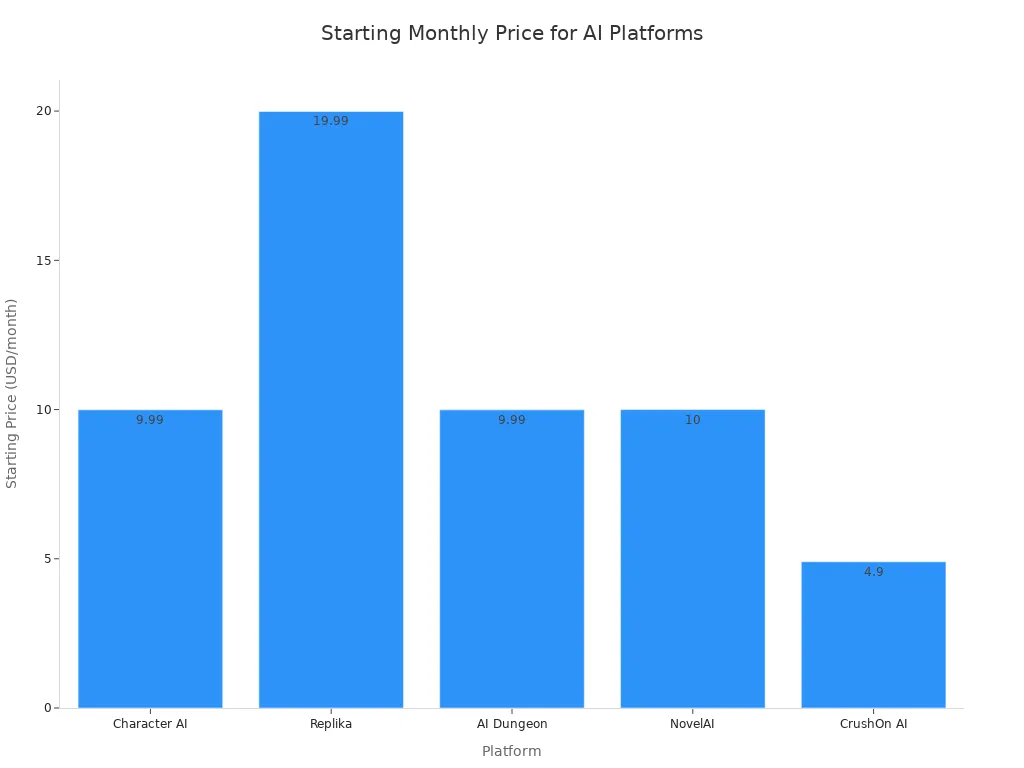
Many platforms use a "freemium" approach. They offer a free tier with basic features and a paid tier with premium benefits. This lets users try your ai before they buy. The table below shows how other platforms structure their pricing.
| Platform | Free Tier | Starting Price | Key Premium Features | Pricing Model |
|---|---|---|---|---|
| Character AI | Yes | $9.99/month | Faster responses, exclusive features | Freemium + monthly/annual subscription |
| Replika | Yes | $19.99/month | Enhanced ai memory, customization | Freemium + tiered subscription |
| AI Dungeon | Yes | $9.99/month | Advanced story-building, creative control | Freemium + subscription |
| NovelAI | Limited | $10/month | Creative writing, storytelling ai | Subscription only |
| CrushOn AI | Yes | $4.9/month | Unfiltered chat, high customization | Freemium + paid tiers |
Subscription prices vary across the market. Your pricing should reflect the value your ai platform provides.
Navigating Key Ethical and Legal Duties
You have a duty to protect your users. An ai companion platform handles sensitive data and emotions. You must address key ethical issues like data privacy and emotional dependency. Users may form strong attachments to an ai that cannot truly feel. Your platform design should prioritize user well-being and avoid manipulation.
You also face serious legal duties. Governments worldwide are creating laws to manage ai content. You are responsible for any harmful material your platform generates.
- The United States has strict laws against non-consensual deepfakes and AI-generated child abuse material.
- The United Kingdom's Online Safety Act requires you to remove illegal ai content.
- The European Union's AI Act classifies some ai generators as high-risk, demanding strict transparency.
Creating Terms of Service and Privacy Policies
Your Terms of Service (ToS) and Privacy Policy are your legal shield. These documents create a clear contract between you and your users. Your legal writing must be precise and easy to understand. A strong ToS protects your platform from liability.
Your ToS should include several key clauses:
- AI-Generated Content Disclaimer: State that ai responses are not professional advice and may be inaccurate.
- Limitation of Liability: Clarify that you are not responsible for data loss or a user's emotional experiences.
- User Content Rules: Define what users can and cannot do on your platform.
- Termination Clause: Explain the conditions under which you can terminate a user's account.
Your Privacy Policy must explain how you collect, use, and protect user data. This transparency is vital for building trust with users and complying with regulations. Working with a legal professional for this writing is a wise investment for any ai company.
You now have a complete roadmap for your project. Your best first step is launching an AI MVP. This approach lets you validate your AI concept quickly. Successful startups use AI tools to accelerate development and reduce costs.
| Startup | AI Application in MVP | Key Outcome/Benefit |
|---|---|---|
| Startup A (SaaS Project Management) | Utilized AI tools (ChatGPT for onboarding scripts, Midjourney for UI visuals) for product development. | Released MVP 6 weeks ahead of schedule by automating text, micro-interactions, and using predictive models for navigation. |
| Startup B (Health Tech) | Employed machine learning to analyze user behavioral trends. | Doubled user retention in the first month by identifying most used features, customizing dashboards, and adjusting pricing/communication. |
| Startup C (Edtech Language Learning) | Integrated AI-driven chatbots and no-code testing solutions. | Reduced development costs by over 40% by substituting human support with chatbots and automating bug/interface testing. |
Your initial writing should focus on a core experience. Later, your writing can expand to advanced AI features. This guide's writing makes you a prepared AI girlfriend webmaster.
FAQ
What is the fastest way to launch my platform?
You can launch fastest by using a pre-built LLM API. This method lets you focus on your app's design instead of AI hardware. You can release a Minimum Viable Product (MVP) quickly to test your idea with users.
How much does a basic AI platform cost to run?
Your costs depend on your choices. An API-based platform on a simple server can cost under $50 per month. Self-hosting a model requires a GPU server. These servers start at over $500 monthly, making it a much larger investment.
How do I make my AI character unique?
You make your AI unique with prompt engineering. Your writing defines the AI's personality and tone. You can assign it a specific role, like a cheerful friend. This practice makes the character's responses consistent and memorable for your users.
Do I need a lawyer for my platform?
You should always consult a legal professional. They help you write your Terms of Service and Privacy Policy. This action protects your business. It also ensures you follow important data privacy laws like GDPR and CCPA.
See Also
Your 2025 Guide: Crafting a Free Virtual AI Companion Online
Building Your Own Free AI Girlfriend: A Simple Online Method
Choosing the Best 3D AI Girlfriend Platform for Your Needs
Understanding AI Girlfriends: Their Functionality and Core Mechanics Explained