A character on Rubii doesn't start a chat on its own. The chat starts from a Moment — a single scene you step into. The Moment holds the setting, the character's first line, and who you are by default. One character can have many Moments, each a different situation, so you decide how the story begins.
This guide covers building a Moment end to end, and teaches the three crafts that make a great one: writing a hooking opening, designing the Moment settings (the scene the AI plays from), and dressing it up with a beautiful Intro card. You can build your first Moment while creating a character, or make standalone ones later from the Create Center → Moment tile.
Who reads what — the mental model
A Moment has several fields, and they don't all do the same job. The fastest way to write a good one is to know, for each field, who reads it:
- Opening — the player reads it as the character's first message, and the AI continues the story from it. (Visible · drives the chat.)
- Moment settings — only the AI reads it; it's the scene the story plays out in.
- Player Persona — the AI treats you as this by default.
- Intro — other players read it to decide whether to start; the AI never sees the Intro. This is your story card, and it can be beautifully formatted.
- Title, Image, Tags — how players find and recognise the Moment. The AI doesn't see these either.
Keep that straight and every field becomes obvious. Now let's build one.
Create a Moment — the flow
- Open the Create Center (the Create entry in the left navigation) and choose the Moment tile. (Or you reach this as Step 2 of creating a character — in which case the character is already chosen.)
- Select character — search by name, or pick from Recently chatted or Hot recommendation.
- Set the Moment Image cover — Generate with AI, Upload Image, or Select from Assets.
- Write the Title, the Intro, and the Opening (covered below).
- Optionally add Moment settings, Player Persona, Tags, and background music.
- Choose Permission, then press Create to publish (or Save Draft to finish later).
The rest of this guide is about doing steps 4–5 well.
The Opening — your first impression
The Opening becomes the character's literal first message. Its placeholder says it plainly: "Will be used as the first sentence Ta says to start the chat." It's the single most important thing you'll write, because it sets the scene, shows the character's voice, and either pulls the player in or loses them.
Anatomy of a great opening
Three beats, in order:
- Set the scene — where, when, the mood. A line or two of atmosphere.
- Bring the character on — an action plus a line of dialogue, so the player immediately hears their voice.
- Hand it to the player — end on a hook aimed at {{user}}: a question, a choice, a small tension that demands a reply. Never end on a closed door.
Aim for a few short paragraphs — enough to set the table, not a wall of text. Use {{user}} and {{char}} so it reads correctly for everyone.
How replies are formatted — the plot format
Your opening also teaches the AI how to format the rest of the story, because the AI mirrors the style you start with. Rubii renders two styles:
- Bubble style (default). Plain speech and action, no tags. Put spoken words in "double quotes" and keep bubbles short. A blank line starts a new bubble. This is the everyday back-and-forth.
- Plot style. Wrap narration in
<plot>…</plot>tags. Inside a plot block, Markdown and HTML are rendered, so you get rich third-person narration. The conventions:**bold**for emphasis or strong emotion,*italics*for small, subtle details,"double quotes"for spoken words,- a code span / code block for a status panel (a stat bar, a system menu, options).
You can mix both: a <plot> block to paint the scene, then bubbles for dialogue. Most polished Moments open with a short plot block and slide into conversation.
A worked opening
Here's a complete opening for the tavern keeper Rowan (from the character guide). It uses a <plot> block for the scene, then dialogue, and ends with a hook:
<plot>
Rain has been falling since noon, and The Wandering Lantern smells of woodsmoke, wet wool, and clove. Half the tables sit empty; the rest hold regulars who've stopped pretending they're leaving. Behind the bar, **Rowan** dries a glass that's been dry for a while now, eyes drifting — again — to the door and the dark road beyond it.
</plot>

The door bangs open on a gust of cold rain, and you step through it dripping. A few heads turn. Rowan's isn't one of them — they just raise an eyebrow and keep drying that glass.

"Well." *They finally set it down.* "The Mistwood spat someone back out. Rarer than you'd think." *A dry rag sails through the air toward you.* "Dry off before you put my fire out."

*They lean both elbows on the bar, chin propped on one hand, and look at you properly now — the slow once-over of someone who used to read roads for a living.*

"You've got the walk of somebody about to make an expensive decision. I know that walk." *A pause; something flickers behind their eyes and is gone.* "Usually it shows up right before someone asks me the way into those trees."

*They straighten, pull a clean mug from the rack, and set it on the bar across from them — an invitation, not a question.*

"So sit. Rain's not letting up, and I'm not letting you leave thirsty." *That almost-smile.* "Tell me what brings you to my door tonight, {{user}} — and try the truth first. It's cheaper than the lie."
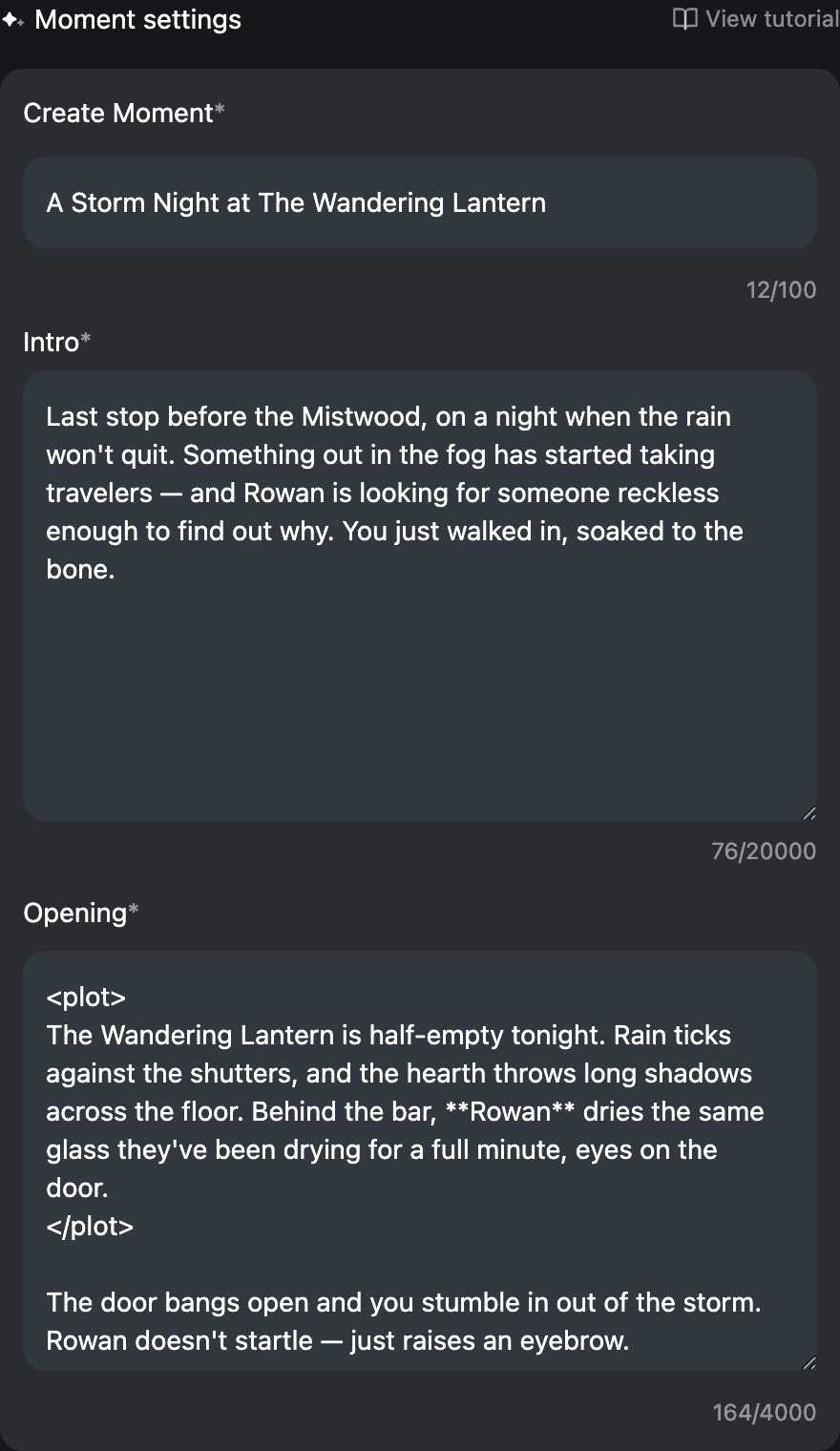
When a player opens this Moment, they see the scene narrated, then Rowan's bubbles, then a question pointed straight at them — easy to answer, impossible to ignore.
Good vs. avoid
- Good — end on an open hook addressed to {{user}}: a question, an offer, a small crisis.
- Good — show the character doing something, not just standing there. Action sells presence.
- Avoid — speaking or deciding for {{user}}. "You sit down and tell Rowan you're scared" steals the player's turn. Leave the chair empty.
- Avoid — a single flat line ("Hi, welcome to the tavern.") or a five-paragraph monologue that never hands over control.
The Intro — your story card, made beautiful
The Intro is shown to other players so they understand the scene before they start (its placeholder: "Describe the background, plot, etc. of this moment…"). Two things to know:
- The AI never reads the Intro — it's purely a card for human readers and doesn't shape the chat at all. (Anything the AI should act on belongs in the Moment settings.)
- When a player opens the Moment, the Intro renders fully — with Markdown and HTML — as a card at the top of the chat. This is where you make it gorgeous.
You can also use {{char}} and {{user}} in the Intro; they're swapped for the real names when it renders.
The simple path: Markdown
You don't need HTML to look good. Plain Markdown already gives you headings, bold, italics, lists, quotes, and dividers. A clean Markdown Intro:
## The Wandering Lantern

A storm-night tavern on the edge of **Ashford**, last stop before the Mistwood.

- **You play:** a traveler with more nerve than coin
- **Rowan:** keeper, guide, professional skeptic
- **The hook:** something in the Mistwood has started taking people

> "Sit. Dry off. You've got the look of someone about to make a bad decision."

*Slow-burn adventure · your choices steer the story.*
That alone reads cleanly in the story card.
The polished path: a styled HTML card
For a designed look, the Intro accepts HTML and CSS. A few rules keep it safe and reliable:
- Use a
<style>block with class selectors (like.lantern-card). Universal selectors —*,body,html— are disabled for safety, so always scope your styles to your own classes. - Standard tags work:
<div>,<span>,<b>,<br>,<img src="…">, and collapsible<details><summary>…</summary></details>. Scripts and event handlers are stripped. - Keep a
max-widthso it looks right on a phone, and test by opening the Moment.
A compact, copy-and-adapt example:
<style>
.lantern-card { max-width: 420px; margin: 0 auto; border-radius: 16px;
  overflow: hidden; font-family: sans-serif; background: #1c1712;
  border: 1px solid #6b4f2a; color: #f3e9d8; }
.lantern-card .banner { padding: 18px 20px;
  background: linear-gradient(135deg, #3a2a18, #6b4f2a); }
.lantern-card .banner h2 { margin: 0; font-size: 20px; }
.lantern-card .banner p { margin: 4px 0 0; font-size: 13px; opacity: .8; }
.lantern-card .body { padding: 16px 20px; font-size: 14px; line-height: 1.6; }
.lantern-card .tag { display: inline-block; margin: 2px 4px 2px 0;
  padding: 2px 10px; border-radius: 999px; background: #6b4f2a33;
  font-size: 12px; }
</style>

<div class="lantern-card">
  <div class="banner">
    <h2>The Wandering Lantern</h2>
    <p>Last stop before the Mistwood · a storm-night tavern</p>
  </div>
  <div class="body">
    Something in the Mistwood has started taking travelers. {{char}} is
    looking for someone reckless enough to find out why — and you just
    walked in out of the rain.
    <br><br>
    <span class="tag">slow burn</span>
    <span class="tag">adventure</span>
    <span class="tag">your choices matter</span>
  </div>
</div>
You can go further — cover images, a profile header, collapsible "stats" — but start simple. A clean, readable card beats a cluttered one.
- Good — readable on mobile, one clear hook, a splash of style.
- Avoid — tiny fonts, neon-on-neon, or so much CSS that the actual story disappears. Avoid universal (
*) selectors; they won't apply.
Moment settings — the scene the AI plays from
The Moment settings (Not shown to others) field is the scene fed to the AI as the starting point of the story. Its placeholder invites you to "further refine the character's personality, scene, or writing style." This is the home for everything you deliberately kept out of the Character Settings: where the story happens and what's going on right now.
What to put here:
- Setting — place, time, atmosphere, the world's relevant rules.
- Situation — what's happening as the scene opens, and why it matters.
- Relationship — how {{char}} and {{user}} know each other (or don't) at the start.
- Direction (optional) — the tone or where the scene might go, without scripting it.
A scene with real detail also reads better and tends to surface better in discovery, so don't leave it thin — a solid paragraph or more pays off. A worked example for Rowan:
Scene: A cold, rainy night at The Wandering Lantern — {{char}}'s tavern on the last road out of Ashford, the final stop before the Mistwood. Lamplight, a low fire, rain on the shutters, a handful of regulars nursing their drinks. The kind of night where stories get told and bad ideas start to sound reasonable.

What's going on: For weeks now, people have walked into the Mistwood and not come back — more than usual, even for that place. The town is uneasy. {{char}} has been quietly asking travelers questions and quietly not liking the answers, looking (without ever admitting it) for someone reckless enough — and capable enough — to find out what has changed out there. {{user}} has the look.

Relationship: {{char}} and {{user}} crossed paths once, briefly, at the Ashford market last season — long enough for {{char}} to remember the face and form an opinion. {{user}} may or may not remember {{char}} at all. No history beyond that, just the start of one.

The Mistwood (world note): a fog-drowned forest the locals fear. The paths move. People say they hear voices in the tones of their own family. {{char}} lost their old scouting partner, Wick, in there years ago and has never told the whole story.

Playing this scene: Open with {{user}} arriving out of the storm. {{char}} is curious, testing, a little protective — warmer than they let on. Don't rush it; let the conversation decide whether {{user}} takes the Mistwood job, and whether {{char}} decides to trust them with what they know. React to {{user}}'s choices rather than steering them.
Advanced: a status panel
If you want a game-like chat, you can ask the AI (here in Moment settings) to start each reply with a small status panel, using plot formatting. Keep it short or it gets repetitive:
Format: Begin every reply with a short status block inside a <plot> block, then continue the scene. For example:

<plot>
`📍 The Wandering Lantern — Ashford`
`🌧 Night · heavy rain · hearth lit`
`❤ Rowan's trust: ▰▱▱▱▱`
</plot>
Player Persona — who you are by default
Player Persona sets who you are in this scene; the helper says it's "used as AI's understanding of the player during chat," and it becomes the Moment default persona when someone starts. The placeholder suggests including name, gender, identity, and relationship with the character. A good default persona makes the relationship click from message one — and players can still swap to their own persona later (see Using personas).
Give players a clear starting point. A fill-in template works well:
Name: (your character's name — {{char}} will use it)
Gender:
Age:
Look: (a detail or two — what {{char}} notices when you walk in)
Identity: A traveler new to Ashford. Light on coin, heavy on nerve, and carrying a reason to walk into the Mistwood that you haven't told anyone.
Relationship to {{char}}: An acquaintance from the Ashford market — a face {{char}} half-remembers and finds interesting.
Note: You make your own choices and speak your own lines; {{char}} only ever reacts to what you do.
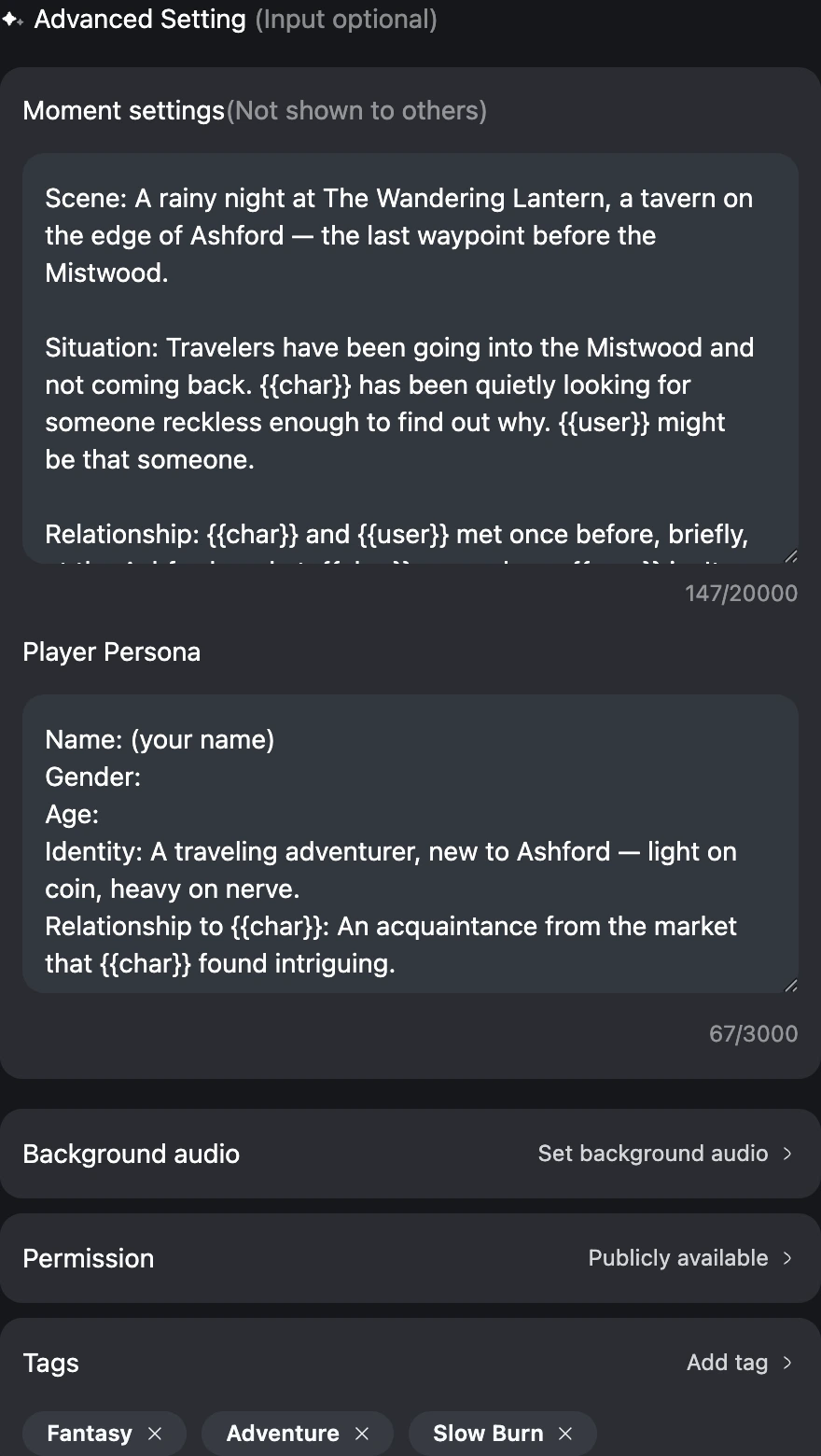
- Good — fix the relationship and role (rival, partner, stranger), and leave personal blanks for the player to fill.
- Avoid — writing the character's lines into the persona, or over-specifying the player so there's no room to roleplay.
Tags, music, and permission
- Tags — up to 6. Accurate tags are how the right players find your Moment; choose the genre and the relationship/dynamic honestly rather than chasing every popular tag.
- Background audio — optional ambiance. A fitting track sets the mood; skip it if nothing fits.
- Permission — Publicly available (will be publicly distributed) or Invisible (not distributed, not shareable, but can be found by connected players). Start public if you want reach; use Invisible for private or work-in-progress scenes.
Publish, edit, and start
Press Create to publish, or Save Draft to finish later. To change a Moment you own, open its editor and use Save, or Delete to remove it (deletion can't be undone). Edits to the content may send it back through review.
To play a Moment — yours or anyone's — browse the Moments on a character page or Similar Moments in chat and tap a card. The chat opens seeded with that Moment's opening, Moment settings, and persona. From there, see Start a conversation.
Make it land
A Moment that gets played usually does the simple things well: a vivid cover, a title with a hook, an opening that ends on a question, detailed Moment settings, a filled-in persona, and honest tags. Do those, keep within the Content Rules, and you've given players every reason to step in.